Darlene
English · Narration
Turn serialized fiction into narrated episodes released on your own schedule, one consistent voice per story, exported as MP3 chapter by chapter.
“VocalLab AI nailed the process, and the output is better. Way better. I love the ability to steer voices and ease of adding emotions/ sighs/ coughs.”
“I can upload a Word document, select automatic casting, click a button, and out comes a fully dramatised audiobook with different voices and performances.”
Step-by-step guide
Start for free — no credit card, no software to install.
Turn Fiction Into Voice Narration
Everything you need to create professional voiceovers — in one tool.
Use cases
From TikTok to podcasts — here's where creators use this tool most.
vs Standard TTS
See why creators switch from generic TTS tools to VocalLab.
| VocalLab AI | Standard TTS | |
|---|---|---|
| Audio quality | Studio-quality AI | No |
| MP3 export | Yes | No |
| SRT caption export | Yes | No |
| Word-level highlighting | Yes | No |
| Emotion & style control | Yes | No |
| Commercial rights | Yes | No |
| Instant generation | Yes | No |
| Free tier | No credit card needed | No |
Matched to this tool. Play a sample, then use it in Studio.
About this tool
Turn serialized fiction — a web novel or episodic story published chapter by chapter — into narrated audio episodes you can release on your own schedule.
People also search for
FAQ
Something not covered here? Contact us · support@vocallab.ai
No, you only generate the newest chapter each time, so ongoing updates take a fraction of the effort.
Yes, locking in one narrator voice keeps every episode sounding consistent as your series continues.
Yes, you can assign a distinct narrator to each series so listeners can tell them apart.
A single chapter typically generates in a few minutes, quick enough to release alongside a text update.
Yes, the generated audio carries full commercial rights, so you're free to publish or monetize each episode.
Upload your manuscript, cast the voices and export every chapter. Free to start.
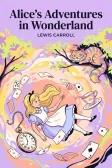
Lewis Carroll
Alice's Adventures in Wonderland
Alice asks the grinning Cheshire Cat for directions — and gets none.
The Cat only grinned when it saw Alice. It looked good-natured, she thought; still it had very long claws and a great many teeth, so she felt it ought to be treated with respect.
Cheshire Puss, would you tell me, please, which way I ought to go from here?
That depends a good deal on where you want to get to.
I don't much care where—
Then it doesn't matter which way you go.
—so long as I get somewhere.
Oh, you're sure to do that, if you only walk long enough.